Siemens TIA-SERV2 online training: practical review and what it covers
I just finished Siemens TIA-SERV2 (SIMATIC Service 2 in the TIA Portal) training. It was the first time Siemens ran this course online. Here is a quick look at what the setup looks like and what the course covers.
The online lab setup
There is no physical training rack in front of you. Everything runs on a virtual setup in TIA Portal v21. The project uses:
- S7-1500 (
CPU 1513F-1 PN) - ET 200SP distributed I/O (
IM 155-6 PN ST) - TP700 Comfort HMI panel
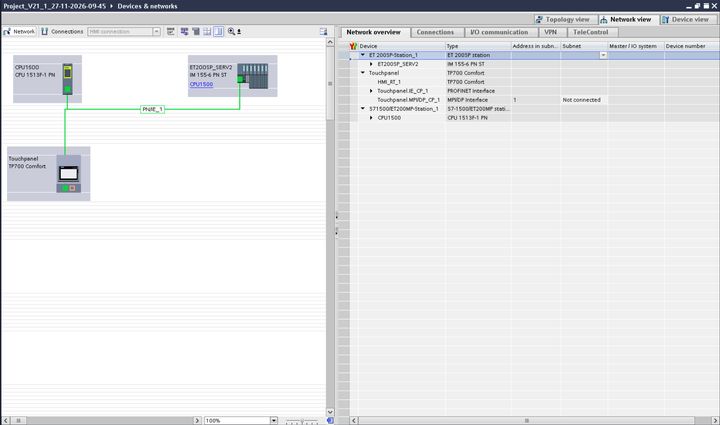
To make the online lab work like a real plant, Siemens uses three tools next to TIA Portal:
- S7-PLCSIM Advanced: runs the virtual S7-1500 CPU on its own IP address (
192.168.111.22), so TIA Portal connects to it like a real PLC. - WinCC Runtime Advanced: simulates the TP700 Comfort panel on your screen.
- Factory I/O: a 3D factory hall with a conveyor belt, three bays, sensors, a light barrier, a control cabinet with buttons, and a reject ramp.
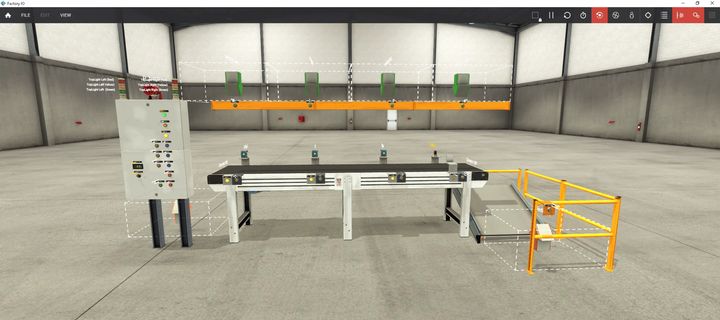
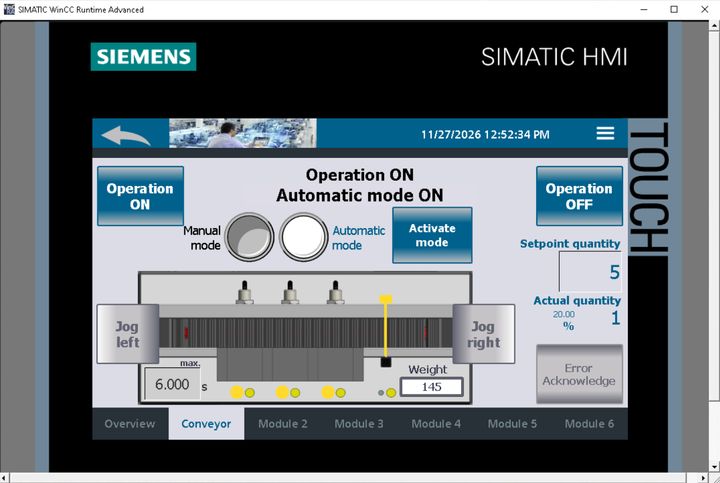
The online setup works well. You press buttons on the virtual cabinet or the HMI screen, boxes move on the conveyor, sensors switch, and faults show up. You cannot unplug a physical PROFINET cable, so hardware faults are simulated, but for learning TIA Portal and finding faults it does the job.
What is covered in TIA-SERV2
TIA-SERV2 comes after SERV1. It is made for service and maintenance engineers who commission PLC systems, read existing code, and find faults.
Here is what the course covers:
1. Commissioning, Watch tables, and timers
You start from scratch. You reset the CPU and memory card, assign PROFINET device names, check I/O wiring with Watch tables, and test a faulty Factory I/O scene before running the full program. You also test code block by block using RET in OB1. Old SIMATIC timers and hardware clock bytes get replaced with IEC timers and Siemens LGF (Library of General Functions) blocks like LGF_Frequency.
2. Data Blocks (DBs) and online changes
The course focuses on Data Blocks instead of old M memory:
- Optimized vs non-optimized DBs
- Start values, snapshots, and
Retain - HMI access flags
- Adding tags to a DB online with Memory Reserve, so live values do not get wiped
3. Functions (FC) vs Function Blocks (FB) and multi-instances
You write the same fault-monitoring logic twice. First as an FC (FaultEvaluationFC [FC7]), and then as an FB (FaultEvaluationFB [FB1]) called inside FaultMonitoring [FB2] as a multi-instance. Putting both next to each other makes the difference clear.
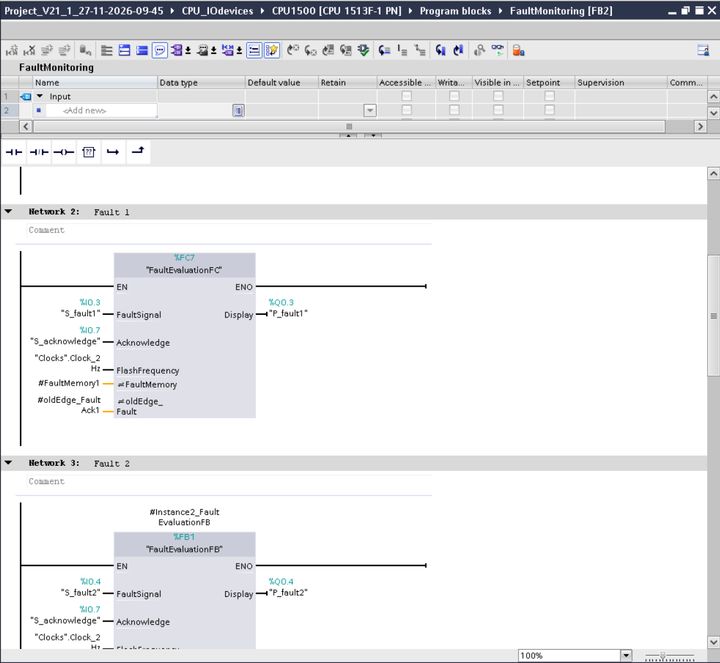
Look at Network 2 and Network 3 above. FaultEvaluationFC needs #FaultMemory1 and #oldEdge_FaultAck1 passed in from outside, because an FC cannot keep data between scans. FaultEvaluationFB stores that inside its own instance DB, so the call stays simple.
4. Troubleshooting tools and TRACE
This is the main part of the course. You find system errors and program bugs using:
- CPU Diagnostics Buffer (and jumping to the faulty line with "Open in editor")
- Cross-references and Call Hierarchy
- Call Environment to monitor one exact call of a reusable FB
- Watch table trigger points (start or end of scan cycle)
- Offline/Online and Offline/Offline block compare
- TRACE: records fast signals in the CPU memory with a trigger, so you can catch short glitches that normal online monitoring misses
5. Organization Blocks (OBs), error handling, and diagnostics
You go through the main OBs (OB1 cycle, OB100 startup, OB30 cyclic interrupt, OB40 hardware interrupt) and error OBs (OB80, OB82, OB83, OB86, OB121, OB122). This shows what stops the CPU and what lets it keep running.
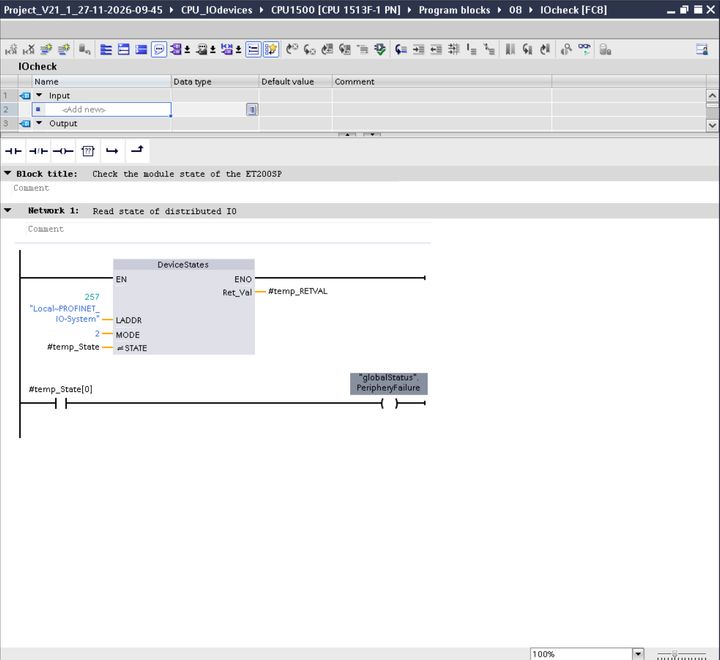
You also build IOcheck [FC8] using DeviceStates to check the ET 200SP distributed I/O. If a module or station drops off PROFINET, it sets PeripheryFailure.
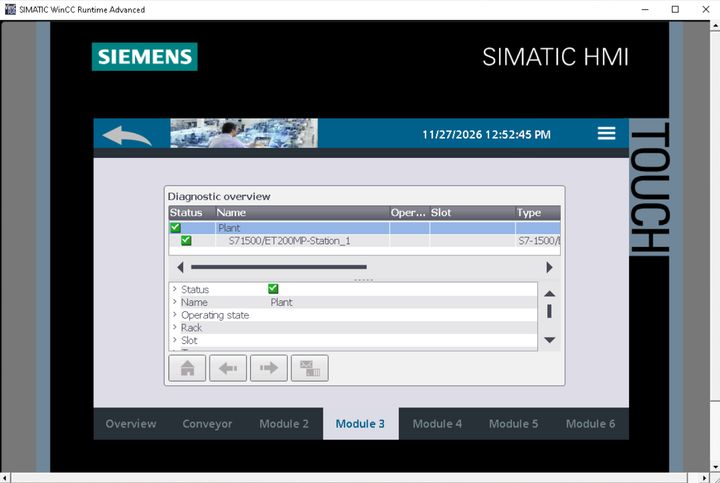
On the TP700 Comfort, you set up bit alarms (with slice access like "HMIalarms".BitAlarm[0].%X1), analog alarms, alarm windows, and the built-in S7-1500 System Diagnostics view. Once enabled, system diagnostics needs no extra PLC code.
6. Analog values, HMI Life Bit, and time sync
- Analog scaling: reading raw values (
-27648to+27648), scaling withNORM_XandSCALE_X, checking weight limits withIN_RANGEinCyclicInterrupt_WeightCheck [OB30], and learning when:Pdirect I/O access is used. - HMI Life Bit and Time Sync: syncing the TP700 clock from the CPU, and watching the HMI
Coordinationlife bit in a cyclic interrupt OB so the PLC knows if the panel freezes or disconnects.
7. Intro to SCL and S7-GRAPH
At the end of the course, you get a short intro to two other PLC languages:
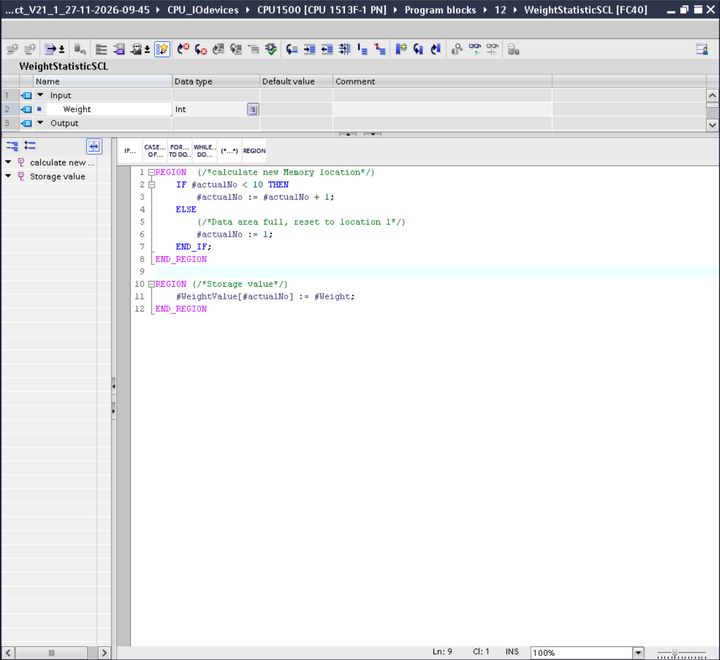
- SCL (Structured Control Language): text-based code that is much easier than LAD for math, loops, and arrays. We made
WeightStatisticSCL [FC40], a 10-slot ring buffer that stores the last ten box weights.
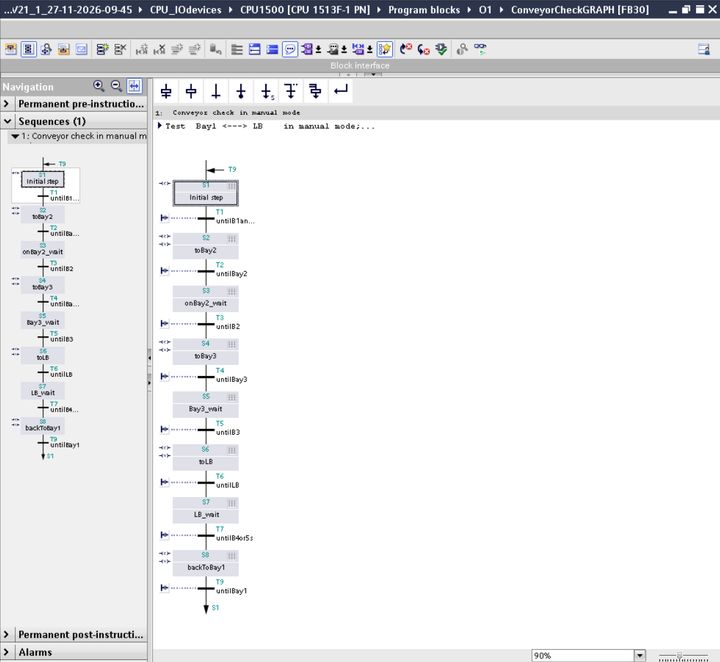
- S7-GRAPH: a step-by-step sequencer language. We used it for
ConveyorCheckGRAPH [FB30], an 8-step manual test that moves a box across all three bays and the light barrier, with interlocks, supervisions, and GRAPH alarms on the HMI.
The course finishes with a final exercise where you commission the system, find faults, and add small changes to the code.
What gives you an advantage in this course
This course is easy to follow if you already know a few PLC basics. These things help a lot:
Knowing Siemens CPU memory
A lot of TIA-SERV2 comes down to how Siemens CPU memory works:
- Why S7-GRAPH must be an FB: Because an FB has memory built in. A sequence has to remember the active step, step timers, interlocks, and supervisions. All of that stays in the FB's instance DB. An FC has no static memory, so it cannot do this on its own.
- Temp vs Static:
Temptags are cleared every scan cycle.Statictags stay in the FB's instance DB and keep their values. If you mix them up, your code will act weird. - Multi-instance FBs: Putting child FBs (like timers or fault blocks) inside the
Staticsection of a parent FB keeps all the data in one DB instead of creating lots of small DBs. - DB Memory Reserve: Turning on memory reserve lets you add new tags to a DB online without resetting live values.
- Overlapping
Mmemory addresses: In SiemensMmemory, a Word takes two bytes.MW20usesMB20(high byte) andMB21(low byte).MW21usesMB21(high byte) andMB22(low byte). Because both shareMB21, writing toMW20overwrites the upper 8 bits (high byte) ofMW21, and writing toMW21overwrites the lower 8 bits ofMW20. Always stepMWby 2 (MW20,MW22,MW24) andMDby 4, or just use optimized DBs so TIA Portal handles the addresses for you.
Being good at LAD and SCL
Being comfortable with LAD logic and basic SCL makes the exercises much easier. You spend less time fighting basic syntax and more time on actual fault finding.
Knowing the PLC scan cycle (and why you don't write to the same Q twice)
Knowing how the PLC scan cycle works helps a lot when you debug code. A standard PLC scan cycle works like this:
- Input scan: The PLC reads physical input states into memory, called the Process Image Input (PII) or input image table, giving your code a frozen snapshot for that scan.
- Program execution: The CPU runs your logic (top to bottom, left to right) using that stored PII snapshot rather than live terminal reads, updating internal memory and an output image area (PIQ) as it goes.
- Output scan: The PLC copies the output image from memory to the physical output modules so field devices change state.
- Housekeeping: It handles communications, diagnostics, and system checks before looping back around.
Because physical outputs only update at the end of the scan, you should never write to the same Q output twice in your program. If one network sets %Q0.1 high and a later network sets %Q0.1 low in the same scan, the second write overwrites the first one. The first coil never reaches the output card.
A few TIA Portal quirks to know
TIA Portal has a few quirks that come up during the course:
- Hardware config alone will not put an S7-1500 into RUN: After a factory reset, downloading only the hardware config leaves the CPU in STOP until you download at least one program block.
- Monitoring a reusable FB can show the wrong call: If an FB is called five times and you just turn monitoring on, TIA shows the first call. Set the Call Environment to the exact instance you want to check.
- Double coils can fool normal monitoring: If two networks write to the same output in one scan, normal monitoring can hide it. Use a Watch table set to trigger at the start or end of the scan cycle.
- Not all DB edits are safe online: Adding tags inside memory reserve keeps live values, but changing data types or existing structure resets the DB back to start values. Take a Snapshot before changing a live DB.
- Block Compare language mismatch: If offline and online projects use different editing languages (like English US vs English UK), Block Compare can flag identical blocks as different.
Final verdict
For the first online TIA-SERV2 course, Siemens did a good job. TIA Portal v21 with S7-PLCSIM Advanced, simulated TP700 Comfort, and Factory I/O works well from home.
The course is good if you work with S7-1500, ET 200SP, and Comfort panels. If you already know how CPU memory works, how the PLC scan cycle runs, and basic LAD and SCL, the exercises will be easy to follow.